Leister Canada
  • Home
  • Equipment
    • All Equipment >
      • Air Heaters
      • Automatic Equipment
      • Blowers
      • Extrusion Welders
      • Hot Air Blowers
      • Hot Air Hand Tools
      • Testing Equipment
    • Flooring
    • Geomembrane
    • Industrial Fabrics
    • Manufacturing
    • Plastic Fabrication
    • Roofing & Decking
  • Services
    • Product Selection Help
    • Design Services
    • Installation Support
    • Product Training
    • Product Service
  • Resources
    • Articles
    • Case Studies
    • System Design Calculations
    • Operating Manuals
    • Tech Tips
    • Whitepapers
  • About Us
  • Contact
    • Contact Us
    • Find a Distributor
  • Français

Changing a Welding Shoe on a Leister Extrusion Welder

6/1/2018

 
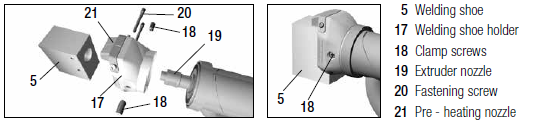
Picture

Disassembly

  • The welding shoe must only be changed when the tool has attained its operating temperature. Wear temperature resistant gloves.
  • Remove the welding shoe holder (17) by unfastening the clamp screws (18) from the extruder nozzle (19)
  • Every time the welding shoe is changed, clean the extruder nozzle (19) of welding residue. The extruder nozzle has a left-handed thread. Make sure that the nozzle is screwed in tight by turning it counter-clockwise using a 13 mm wrench.
  • Remove the welding shoe (5) from the welding shoe holder (17) by either
    1. Unfastening the fastening screws (20), or
    2. In the case of an older shoe, unfastening the four screws at the rear of the welding shoe holder

Read More

How to Change a Red Tire on a Leister Automatic Welder

5/2/2018


Tools Needed:

  • Paper towels, and a solution such as Goo Gone to clean the tire residue off of the rim
  • Utility knife
  • Hot soapy water in a bucket
  • For VARIMAT, UNIMAT V, HEMTEK upper wheel: 8mm hex tool
  • For VARIANT T1, UNIPLAN, UNIROOF E, VARIANT, UNIFLOOR, MINIFLOOR: 2mm hex tool
  • For UNIROOF AT/ST, HEMTEK lower wheel: 2.5mm hex tool
  • For UNIPLAN narrow wheel: External circlip removal tool

Steps:

  1. Put the new tire in the hot soapy water.
  2. Remove the wheel with the tire that needs to be changed:
    • VARIMAT drive wheel: Remove the green round belt and the 8mm hex bolt and washer; pull off the wheel; remove the parts inside the rim. Take the key out of the keyway in the axle so that it does not fall out and get lost while the rim is off.
    • VARIMAT rocker wheel, UNIMAT V narrow wheel, HEMTEK upper wheel: Remove the 8mm hex bolt and pull off the wheel.
    • UNIPLAN narrow wheel: Use an external circlip removal tool to remove the circlip. Then follow step 4.
    • VARIANT T1, UNIPLAN, UNIROOF E, VARIANT, UNIFLOOR; MINIFLOOR: Turn the tool on its side and drive the wheel until the set screw on the inside of the rim is visible. Loosen the set screw with the 2mm hex tool and pull off the wheel.
    • UNIMAT V Tape wide wheel: Remove the 8mm hex bolt and washer; pull off the wheel. Take the key out of the keyway in the axle so that it does not fall out and get lost while the rim is off.
    • HEMTEK lower wheel, or UNIROOF AT/ST: Loosen the two screws on the side of the wheel with the 2.5mm hex tool, and remove the plate. Pull off the tire and the ring under the tire.
  3. Cut the worn tire off with a utility knife.
  4. Clean any tire residue off of the rim.
  5. Take the new tire out of the hot soapy water. With the rim laying on a flat surface, hold the edge of the tire over the closest edge of the rim with both hands. Move one hand to the left and the other to the right to slip the edge of the tire over the rim
  6. Repeat this motion to push the tire further onto the rim until the tire is on almost all of the way.
  7. Use the heel of each hand to push the tire on the rest of the way.
  8. Check closely that the tire is inside the edge of the rim all the way around.
  9. Reinstall the wheel.

How to Change a Lock Pin on the VARIMAT, UNIROOF, or BITUMAT

4/24/2018

 
Many of Leister’s tools utilize a lock pin to hold the nozzle in position during welding and cooldown. The lock pin is designed to snap if excessive force is put on the heater in order to prevent more expensive damage to the tool.
​
The most common reason for a lock pin to bend or break is the tool being lifted or carried incorrectly. The correct methods of carrying the tool are with both hands under the frame, or with one hand under the frame and the other holding the black carrying handle.

In this guide, parts will be referred to using the numbers indicated in the VARIMAT V drawing below. As an example, see lock pin (79).
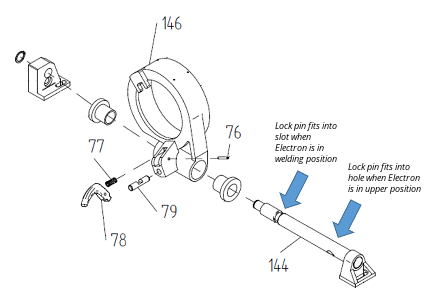
VARIMAT Lock Pin Illustration
This is a simplified drawing.

Read More

How to Change Carbon Brushes in Leister Tools

4/24/2018


Tools needed:

  • Contact cleaner or rubbing alcohol
  • Cotton swabs
  • Small flat screw driver
  • Torx screw drivers, T10 and/or T20, as needed to disassemble the tool housing

Steps:

​Note: Always change both brushes at once. If one brush needs to be changed, change them both.

Read More

How to Build an Extension Cord for your Leister Automatic Tool

5/25/2017

 
If you're building an extension cord for your Leister automatic tool such as the BITUMAT, VARIMAT, or VARIANT T1, here are some things to keep in mind: 
  • Use 12 Gauge cable if less than 100 ft., and 10 Gauge or thicker cable for a 100 ft. or longer extension cord
  • The plug and socket must be the same current rating as the socket and plug they will plug into. Do not bend or file the pins to try to fit them into a different socket, or the plug may not lock properly and may separate from the socket while welding, causing a bad weld and damage to your equipment.
  • Strip the wires clean and be careful to tighten the screws on to the bare wire contacts and not the wire insulation.
  • To connect a 3-prong plug:
    • Connect the green/yellow wire first, to the pin with the bent tab
    • Connect the white wire to one of the pins directly left or right of the bent tab
    • Connect the black wire to the other pin directly right or left of the bent tab
  • To connect a 4-prong plug for work with a generator, check that your plug states “125/250V”, not “3Φ”. Follow the instructions for a 3-prong plug and leave the pin opposite the one with the bent tab disconnected.

Checking your VARIMAT's Power and Extension Cords

5/25/2017

 
If you are having problems with your power cord or extension cord, follow this checklist to confirm your power source and check your plugs, sockets and power cord:

If your VARIMAT is not powering down completely but you suspect a power problem, check your power source.
  • If you are working from a generator:
    • Confirm that the fuel is clean (especially in the winter)
    • Check that its output is good
    • Check that the total power of all tools connected is not more than 80% of the continuous power rating (not the standby power rating) of the generator.
  • If you question any of these, run only the VARIMAT with clean fuel and no extension cord and see if your problem goes away

​If your VARIMAT is powering down completely in the middle of welding:
  • Check that all twist-lock plugs are locked in
  • Check that the current rating of the plugs match the current rating of the sockets they mate into. If not, change plug or socket that is wrong, to match.
  • Check the cord with the VARIMAT power turned on and the heat off. If the VARIMAT is already on and hot, cool it off first.
    • Take hold of the cord at the point closest to the VARIMAT with one hand. Make a circular motion to pull the cord in all directions. If the power turns off even for a moment, there is a break in the cord at that spot (this is the most common spot, caused by the user pulling the VARIMAT or correcting tracking by pulling on the cord).
    • To test the rest of the cord, grasp the cord with one hand beside the other at the VARIMAT. Move one hand in a circle one way at the same time as moving the other hand in a circle the other way. If the power turns off even for a moment, there is a break in the cord near that spot. Repeat from one end of the cord to the other to find the break. If the break is close to one end of the cord, remove the plug or socket at that end, pull the broken wire out, place it beside the cord to see where the break was, and cut the broken area away. 

​See our article on How to Build an Extension Cord for your Leister Automatic Tool if you need to build a replacement cord.

ASTRO Tech Tips

12/12/2016

 
ASTRO Wiring Instructions
Please consider the following when connecting a new plug to your ASTRO:
  • Specifications of the plug: 15 Amp; 250 Volt; 2 pole; 3 wire; grounding; twist-lock
  • When using a generator make sure the plug is wired for A/C

Connecting a twist-lock plug:
  • Connect the green wire to the pin with the bent tab
  • Connect the white wire to one of the pins directly left or right of the bent tab
  • Connect the black wire to the other pin directly left or right of the bent tab

Please consider the following when making an extension cord for your ASTRO:
  • Use a 12 Gauge or thicker cable if you plan to make a 100 ft or longer extension cord

Generator Instructions:
  • Starting procedure:
    1. Switch on the generator
    2. Switch on the ASTRO
  • Shut-down procedure:
    1. Switch off the ASTRO
    2. Switch off the generator

BITUMAT Tech Tips

12/11/2016

 
It is recommended the BITUMAT be run with the temperature dial lower than 9, and not at 9 or 10. 

Before turning the tool on, check the following:
  • The nozzle is not plugged or bent.
  • The back end of the ELECTRON heater (the air inlet) is not clogged.  If it is, tilt the Electron up so that the air inlet is down, and clear the air inlet opening with a soft brush.
  • The nozzle is not wet.  
  • If the nozzle is wet, heat the BITUMAT at minimum heat to dry the element first before applying maximum heat.  

Read More

COMET Tech Tips

12/10/2016

 
COMET Wiring Instructions
Please consider the following when connecting a new plug to your COMET:
  • Specifications of the plug: 15 Amp; 250 Volt; 2 pole; 3 wire; grounding; twist-lock

Connecting a twist-lock plug:
  • Connect the green wire to the pin with the bent tab
  • Connect the white wire to one of the pins directly left or right of the bent tab
  • Connect the black wire to the other pin directly left or right of the bent tab

Please consider the following when making an extension cord for your COMET:
  • Use a 12 Gauge or thicker cable if you plan to make a 100 ft or longer extension cord

Generator Instructions:
  • Starting procedure:
    1. Switch on the generator
    2. Switch on the COMET
  • Shut-down procedure:
    1. Switch off the COMET
    2. Switch off the generator

FUSION Tech Tips

12/9/2016

 
The FUSION is not producing the correct heat
  • Confirm that the correct element has been installed.  The elements for the FUSION 2 and 3C are not the same as the element for the FUSION 3.
  • Check that the air intake filter (located on the housing in front of the extrusion trigger) is clean. A plugged filter will reduce air flow and heat transfer and could cause the element to burn out. Remove any blockage in the filter with a soft brush.

Read More
<<Previous
Forward>>
STANMECH Technologies Inc. 
944 Zelco Drive Burlington ON L7L 4Y3 | 1-888-438-6324 | 
[email protected]
Terms of Use    Privacy    Terms and Conditions of Sale   Warranty Policy
Français

Proud Member of:
Picture
International Association of Geosynthetic Installers
  • Home
  • Equipment
    • All Equipment >
      • Air Heaters
      • Automatic Equipment
      • Blowers
      • Extrusion Welders
      • Hot Air Blowers
      • Hot Air Hand Tools
      • Testing Equipment
    • Flooring
    • Geomembrane
    • Industrial Fabrics
    • Manufacturing
    • Plastic Fabrication
    • Roofing & Decking
  • Services
    • Product Selection Help
    • Design Services
    • Installation Support
    • Product Training
    • Product Service
  • Resources
    • Articles
    • Case Studies
    • System Design Calculations
    • Operating Manuals
    • Tech Tips
    • Whitepapers
  • About Us
  • Contact
    • Contact Us
    • Find a Distributor
  • Français